とりあえず起動させてみるのとbootstrapを使えるようにします
- インストール
npm install -g angular-cli
ng --help
Cannot find module 'rxjs/symbol/observable'
Error: Cannot find module 'rxjs/symbol/observable'
- 依存モジュールをインストール
npm install -g rxjs
- プロジェクトの作成
ng new ngapp --style=scss
cd ngapp
ng serve --host=0.0.0.0
新しいプロジェクトを作成しますstyleでscssを指定、デフォルトだとcssになります
デフォルトだとipはlocalhostになってしまうのでVMで立てるとアクセスできません。
アクセスできるようにhostオプションで変更する
componentの追加
パス指定出来る
components/sampleとかで指定すると src/app/components/sample.component.htmlといった形で生成される
ng generate component sample
ls src/app/sample
sample.component.css  sample.component.html  sample.component.spec.ts  sample.component.ts
これだけでとりあえずは動くものが出来るのでbootstrapを追加してみます
bootstrap font-aweosme
npm install --save bootstrap ng2-bootstrap font-awesome
- src/styles.scss
$fa-font-path: "../node_modules/font-awesome/fonts";
@import "../node_modules/font-awesome/scss/font-awesome.scss";
"styles": [
  "styles.scss",
  "../node_modules/bootstrap/dist/css/bootstrap.min.css"
]
- src/app/app.modules.ts
使用するモジュールを追記していく,ここはng2-bootstrapにサンプルが乗っているので使いたいモジュールを読み込んでいく
import * as bootstrap from 'ng2-bootstrap';

imports: [
    bootstrap.AlertModule.forRoot(),
    bootstrap.TabsModule.forRoot(),
]
- 参考
https://valor-software.com/ng2-bootstrap/#/valor-software.com
試しに何か使ってみる
- src/app/app.component.html
<h1>
  {{title}}
</h1>

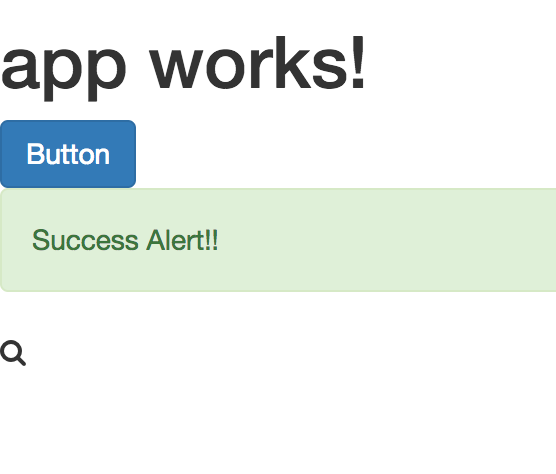
<button type="button" class="btn btn-primary">Button</button>
<alert type="success">
  Success Alert!!
</alert>
<i class="fa fa-search"></i>
アクセスするとこんな感じで無事ng2-bootstrapまでが使えるようになりました
メニューの実装
bootstrapが使えるようになったので次はメニューを実装してみる
- コンポーネントの追加
- routerの追加
- メニューの実装
といった順でやっていきます
コンポーネントの追加
まずはコンポーネントを追加します
ng generate component hoge
ng generate component fuga
src/app以下にディレクトリとファイルが作られます
ls src/app/hoge
hoge.component.html  hoge.component.scss  hoge.component.spec.ts  hoge.component.ts
必要がある場合は生成した各コンポーネントの実装を行います(今回は割愛)
routerの追加
cliで作った雛形にはRoutingは定義されていないので自分で定義する必要があります
angular2の公式に従ってページを追加してみます
- src/app/app.routing.module.ts
import { NgModule } from '@angular/core';
import { RouterModule, Routes } from '@angular/router';

import {HogeComponent} from "./hoge/hoge.component";
import {FugaComponent} from "./fuga/fuga.component";

const appRoutes: Routes = [
  { path: 'hoge', component: HogeComponent },
  { path: 'fuga', component: FugaComponent },
  { path: '', redirectTo: '/hoge', pathMatch: 'full'},
];

@NgModule({
  imports: [
    RouterModule.forRoot(appRoutes)
  ],
  exports: [
    RouterModule
  ]
})

export class AppRoutingModule {}
- src/app/app.module.ts
先ほど定義したroutingモジュールを読み込むようにする
import { HogeComponent } from './hoge/hoge.component';
import { FugaComponent } from './fuga/fuga.component';
import { AppRoutingModule } from "./app.routing.module";

import * as bootstrap from 'ng2-bootstrap';

@NgModule({
  declarations: [
    AppComponent,
    HogeComponent,
    FugaComponent
  ],
  imports: [
    AppRoutingModule,
    BrowserModule,
    FormsModule,
    HttpModule,
    bootstrap.AlertModule.forRoot(),
    bootstrap.TabsModule.forRoot()
  ],
  providers: [],
  bootstrap: [AppComponent]
})
メニュー部分の実装
最後にメニュー部分の実装をします
- src/app/app.component.html
<nav class="navbar navbar-default">
  <div class="container-fluid">
    <div class="navbar-header">
      <a class="navbar-brand" href="#">Sample</a>
    </div>
    <div class="collapse navbar-collapse" id="bs-example-navbar-collapse-1">
      <ul class="nav navbar-nav">
        <li><a routerLink="/hoge" routerLinkActive="active">Hoge</a></li>
        <li><a routerLink="/fuga" routerLinkActive="active">Fuga</a></li>
      </ul>
    </div>
  </div>
</nav>

<router-outlet></router-outlet>
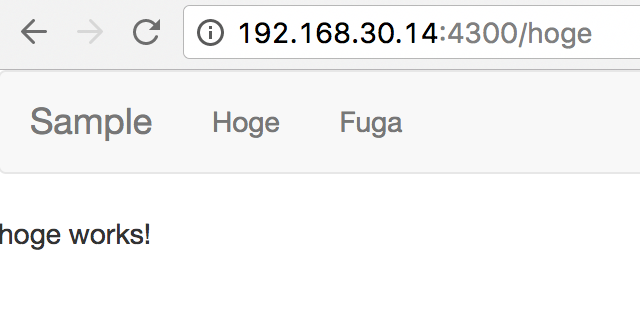
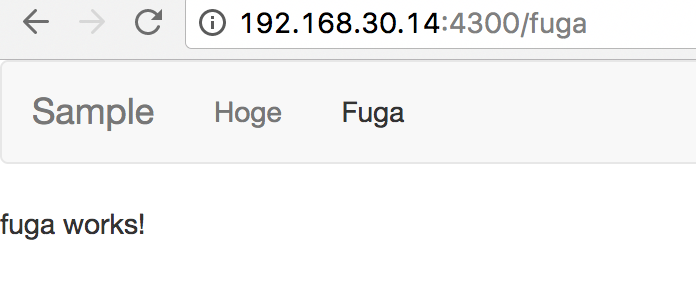
router-outletの箇所にルーターで指定したコンポーネントが出力されます
無事表示まで確認することができました
成果物のビルド
dist以下にコンパイルされた成果物が生成されます
ng build
ls dist
favicon.ico              fontawesome-webfont.woff          glyphicons-halflings-regular.ttf    inline.bundle.js   polyfills.bundle.js   vendor.bundle.js
fontawesome-webfont.eot  fontawesome-webfont.woff2         glyphicons-halflings-regular.woff   inline.bundle.map  polyfills.bundle.map  vendor.bundle.map
fontawesome-webfont.svg  glyphicons-halflings-regular.eot  glyphicons-halflings-regular.woff2  main.bundle.js     styles.bundle.js
fontawesome-webfont.ttf  glyphicons-halflings-regular.svg  index.html                          main.bundle.map    styles.bundle.map
あとはS3に配信するなりサーバに配信するなりするだけですね
まとめ
割と簡単に動くところまで持っていくことができました
実際に色々触ってみるとサーバサイドの開発をしているような感覚で書けるので結構楽しくなってきます
今までフロントは避けてきたところがありますがこれを機に勉強していきたいと思うところです


