親子関係を持った入れ子のデータなどを表示したいといった用件があったときのメモ
angularのバージョンは4を使っています
データは下記のような感じ
stats = [
  {
    id: 1,
    name: 'A001',
    depth: 0,
    children: [
      {
        id: 2,
        name: 'A002',
        depth: 1,
        children:[
          {
            id: 3,
            name: 'A003',
            depth: 2
          }
        ]
      },
      {
        id: 4,
        name: 'A004',
        depth: 1
      }
    ]
  },
  {
    id: 5,
    name: 'B001',
    depth: 0,
    children: [
      {
        id: 6,
        name: 'B002',
        depth: 1,
        children:[
          {
            id: 7,
            name: 'B003',
            depth: 2
          }
        ]
      }
    ]
  }
]
出力イメージは下記
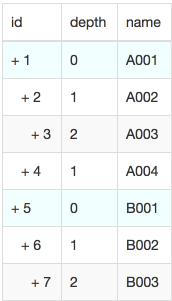
テンプレート側は下記のようにすることで表現できます
<!-- テンプレート -->
<ng-template #rowsTemplate
             let-rows>
  <ng-container *ngFor="let row of rows">
    <tr [style.background-color]="row.depth==0 ? '#EFFFFF' : '' ">
      <td>
        <span [style.padding-left.px]="row.depth * 10">
        + {{row.id}}
        </span>
      </td>
      <td>{{row.depth}}</td>
      <td>{{row.name}}</td>

    </tr>
    <ng-container *ngTemplateOutlet="rowsTemplate; context: {$implicit: row.children}">
    </ng-container>
  </ng-container>
</ng-template>
<!-- テンプレート -->

<table class="table table-striped table-bordered">
  <thead>
    <tr>
      <td>id</td>
      <td>depth</td>
      <td>name</td>
    </tr>
  </thead>
  <tbody>
    <ng-container *ngTemplateOutlet="rowsTemplate; context: {$implicit: stats}">
    </ng-container>
  </tbody>
</table>
テンプレート側ではng-templateにテンプレート変数を設定(rowsTemplate)
*ngTemplateOutletに設定したテンプレート変数を指定
contextにテンプレートに渡す変数を指定
$implicitで指定した変数をテンプレート側のlet-変数名で受け取っている(let-rows)
<ng-container *ngTemplateOutlet="rowsTemplate; context: {$implicit: stats}">
$implicitを使わない場合はcontextで渡した変数のプロパティをlet-変数名=プロパティ名で指定することでテンプレート内で使用できるようになる$implicitをつけるとテンプレート側でプロパティを指定していない変数に自動的に割り当てられる
テンプレート内でrow.childrenをcontextとして自身のテンプレートに渡してあげることで再帰的にテンプレートを呼び出していく
おまけで入れ子の構造を表すためにpaddingを動的にしたりルートに背景色をつけたりとかもしてみました

