以前SessionManagerを試してみて「コマンド実行も行いたい」ということで今回はRunCommandに関して実際に試してみる
AWS Session Managerお試し - notebook
Run Command
sshなどを使用せずSSMエージェント経由で特定のコマンドをインスタンスに対して実行できる
対象インスタンスにssm-agentが入っていることが前提
最近はIAMRoleの設定だけ行えばだいたいは使えるようになる
AnsibleやChefなどのプロビジョニングツール用のコマンドも用意されている
用途としては特定のグループのサーバ郡に対してセキュリティアップデートを実行するなどがある
コマンドの種類(document)
コマンドのタイプはドキュメントと呼ばれて、いろいろな種類がある
cliから指定する場合は--document-nameで指定する
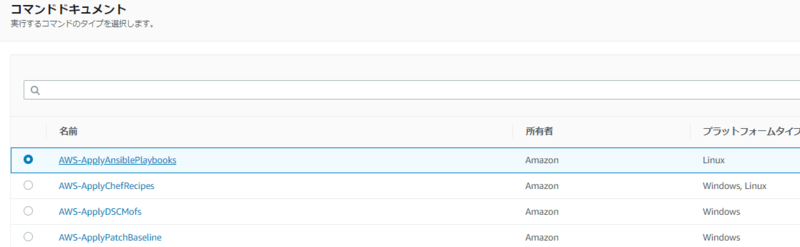
Ansibleのplaybookの適用などもできるみたいなので別の機会に試してみたい
今回はただシェルコマンドを流すだけ試してみるのでAWS-RunShellScriptを使う
実行方法
ssm send-commandで実行コマンドを送る- 1で出力されるIDを用いて
ssm list-command-invocationsで実行結果を取得する
ssh経由でのコマンド実行のように同期的な結果出力がされるわけではないので注意が必要
コマンドの結果を知りたい場合は次の3パターンで対応できる
- 実行コマンドを送信した後実行結果をポーリングするなりして結果を取得できるようにする
- SNSに結果を渡すように設定する、その後はLambdaなり何なりでよしなに通知
- 受け取れる情報的に知れるのは結果のみ
- CloudWatchLogsにログを送る設定を行いログを閲覧する
1つ目に関してはスクリプト書く形になるが探すといくつか同様の内容の記事があったので今回は割愛する
CLIのドキュメントは下記
send-command — AWS CLI 1.18.30 Command Reference
実行してみる
なにはともあれ実際に使ってみる
send-commandで実行したいコマンドを送る
- コマンドの送信
$ aws  ssm send-command --instance-ids i-xxxxxxxxxxxxxxxxx --document-name "AWS-RunShellScript" --comment "id" --parameters commands="id" --output json
{
    "Command": {
        "CommandId": "0635e75d-8047-4787-ba82-11a64fd090a2",
        "DocumentName": "AWS-RunShellScript",
        "DocumentVersion": "",
        "Comment": "id",
        "ExpiresAfter": 1585347674.215,
        "Parameters": {
            "commands": [
                "id"
            ]
        },
        "InstanceIds": [
            "i-xxxxxxxxxxxxxxxxx"
        ],
        "Targets": [],
        "RequestedDateTime": 1585340474.215,
        "Status": "Pending",
        "StatusDetails": "Pending",
        "OutputS3BucketName": "runcommand-result",
        "OutputS3KeyPrefix": "runcommand",
        "MaxConcurrency": "50",
        "MaxErrors": "0",
        "TargetCount": 1,
        "CompletedCount": 0,
        "ErrorCount": 0,
        "DeliveryTimedOutCount": 0,
        "ServiceRole": "arn:aws:iam::000000000000:role/EC22SNSPublish",
        "NotificationConfig": {
            "NotificationArn": "arn:aws:sns:ap-northeast-1:000000000000:run-command-result",
            "NotificationEvents": [
                "All"
            ],
            "NotificationType": "Command"
        },
        "CloudWatchOutputConfig": {
            "CloudWatchLogGroupName": "CWLGroupName",
            "CloudWatchOutputEnabled": true
        }
    }
}
- IDだけほしいときはqueryオプションでよしなに
$ aws  ssm send-command --instance-ids i-xxxxxxxxxxxxxxxxx --document-name "AWS-RunShellScript" --comment "id" --parameters commands="id" --output text --query "Command.CommandId"
a738d38e-bed0-4edb-839f-330cc7496cff
- 実行結果を取得する
先に取得したIDが必要になる
list-command-invocations + --detailで結果を取得する
$ aws  ssm list-command-invocations --instance-id i-xxxxxxxxxxxxxxxxx --command-id a738d38e-bed0-4edb-839f-330cc7496cff --details
{
    "CommandInvocations": [
        {
            "CommandId": "a738d38e-bed0-4edb-839f-330cc7496cff",
            "InstanceId": "i-xxxxxxxxxxxxxxxxx",
            "InstanceName": "",
            "Comment": "id",
            "DocumentName": "AWS-RunShellScript",
            "DocumentVersion": "",
            "RequestedDateTime": 1585340648.947,
            "Status": "Success",
            "StatusDetails": "Success",
            "StandardOutputUrl": "",
            "StandardErrorUrl": "",
            "CommandPlugins": [
                {
                    "Name": "aws:runShellScript",
                    "Status": "Success",
                    "StatusDetails": "Success",
                    "ResponseCode": 0,
                    "ResponseStartDateTime": 1585340649.33,
                    "ResponseFinishDateTime": 1585340649.337,
                    "Output": "uid=0(root) gid=0(root) groups=0(root)\n",
                    "StandardOutputUrl": "",
                    "StandardErrorUrl": "",
                    "OutputS3Region": "ap-northeast-1",
                    "OutputS3BucketName": "",
                    "OutputS3KeyPrefix": ""
                }
            ],
            "ServiceRole": "",
            "NotificationConfig": {
                "NotificationArn": "",
                "NotificationEvents": [],
                "NotificationType": ""
            },
            "CloudWatchOutputConfig": {
                "CloudWatchLogGroupName": "",
                "CloudWatchOutputEnabled": false
            }
        }
    ]
}
CommandInvocations.CommandPluginsの値は--detailオプションをつけないと返ってこない模様
また、実行ユーザーはrootのようなので何でもできそう
SNSでの通知
別途コマンド実行するEC2のIAMRoleにSNSに対するPublish権限が必要
--notification-config,--service-role-arnを指定する
$ aws ssm send-command --instance-ids i-xxxxxxxxxxxxxxxxx --document-name "AWS-RunShellScript" --comment "id" --parameters commands="id" --output json --notification-config "NotificationArn=arn:aws:sns:ap-northeast-1:000000000000:run-command-result,NotificationEvents=All,NotificationType=Command" --service-role-arn arn:aws:iam::000000000000:role/EC22SNSPublish
- サブスクリプションにメールを設定して実行した結果
{"commandId":"b1545f48-5f31-4eee-9580-a3c295e1438a","documentName":"AWS-RunShellScript","instanceIds":["i-xxxxxxxxxxxxxxxxx"],"requestedDateTime":"2020-03-27T20:30:38.242Z","expiresAfter":"2020-03-27T22:30:38.242Z","outputS3BucketName":"","outputS3KeyPrefix":"","status":"Success","eventTime":"2020-03-27T20:30:39.442Z"}
cliのlist-invocationsの実行結果より少ない情報が渡ってくるよう
CloudWatchLogsへログを送る
別途コマンド実行するEC2のIAMRoleにCloudWatchLogsに対する操作権限が必要
--cloud-watch-output-configに必要な設定を記述して実行する
$ aws ssm send-command --instance-ids i-xxxxxxxxxxxxxxxxx --document-name "AWS-RunShellScript" --comment "id" --parameters commands="id" --output json --cloud-watch-output-config "CloudWatchOutputEnabled=true,CloudWatchLogGroupName=CWLGroupName"
- tailしてみる
aws cli v2でロググループに対してtailしてみる
$ aws  logs tail --follow  CWLGroupName
2020-03-27T20:33:09.558000+00:00 74e86678-2230-4501-9953-3e4198402d5d/i-xxxxxxxxxxxxxxxxx/aws-runShellScript/stdout uid=0(root) gid=0(root) groups=0(root)
しっかり実行結果が流れてきた
S3にログを出力する
別途コマンド実行するEC2のIAMRoleにS3に対する操作権限が必要
S3にアウトプットを指定することもできる
--output-s3-bucket-name,--output-s3-key-prefixを指定する
$ aws ssm send-command --instance-ids i-xxxxxxxxxxxxxxxxx --document-name "AWS-RunShellScript" --comment "id" --parameters commands="id" --output json --output-s3-bucket-name "runcommand-result" --output-s3-key-prefix "runcommand"
結果は s3://${bucket}/${prefix}/${id}/${instanceId}/${document}/0.${document}/${stdout or stderr}
に出力される
0.については何かルールがあるはずだが何を指しているか推測できなかった。
- 実行結果
$ aws  s3 cp s3://runcommand-result/runcommand/1587f0a2-55ca-47d9-9f88-2245dbcc1e6c/i-xxxxxxxxxxxxxxxxx/awsrunShellScript/0.awsrunShellScript/stdout -
uid=0(root) gid=0(root) groups=0(root)
まとめ
ssh経由のコマンド実行と同じ使用感を期待していたので思っていた機能と少しずれていたが、ssh key不要でコマンド実行できるのはやはり便利
実行結果に関しても出力先がSNS,CloudWatchLogs,S3など選択肢が多いので困ることはなさそう
機会を見つけてプロダクションで使えるようにしてみたい
余談でawscli v2を用いてロググループに対してのtailを行ったがこれも便利だった

