serverlessとapexがあるようですがなんとなくapexを使ってみます
インストール
curl https://raw.githubusercontent.com/apex/apex/master/install.sh | sh
プロジェクトの作成
apex init
  Enter the name of your project. It should be machine-friendly, as this
  is used to prefix your functions in Lambda.

    Project name: sample

  Enter an optional description of your project.

    Project description: sample function

  Would you like to manage infrastructure with Terraform? (yes/no) no

  Enter IAM role used by Lambda functions.

    IAM role: arn:aws:iam::111111111111:role/lambda_dynamo_streams
  [+] creating ./project.json
  [+] creating ./functions

  Setup complete!

  Next step:
    - apex deploy - deploy example function
それぞれ入力していきます
- プロジェクト名
- 説明
- IAM role
認証情報を設定する
~/.aws/config, ~/.aws/credentialsに情報を設定する
デプロイ
apex --profile swfz --region ap-northeast-1 deploy
   • creating function         function=hello
   • created alias current     function=hello version=1
   • function created          function=hello name=sample_hello version=1
実行
lambdaでのイベントソースをevent.jsonに記述して実行してみる
apex --profile swfz --region ap-northeast-1 invoke hello < event.json
{"hello":"world"}
ログ
$ apex --profile swfz --region ap-northeast-1 logs hello
/aws/lambda/sample_hello 2016-05-27T15:12:28.460Z       k1ciy2kwf2lzbiex        starting function
/aws/lambda/sample_hello START RequestId: 6c72c10e-241d-11e6-9db7-cde4beb156f0 Version: 1
/aws/lambda/sample_hello 2016-05-27T15:12:28.480Z       6c72c10e-241d-11e6-9db7-cde4beb156f0    processing event: {"hello":"world"}
/aws/lambda/sample_hello 2016-05-27T15:12:28.482Z       6c72c10e-241d-11e6-9db7-cde4beb156f0    TypeError: undefined is not a function
    at exports.handle (/var/task/index.js:4:3)
/aws/lambda/sample_hello END RequestId: 6c72c10e-241d-11e6-9db7-cde4beb156f0
/aws/lambda/sample_hello REPORT RequestId: 6c72c10e-241d-11e6-9db7-cde4beb156f0 Duration: 98.27 ms      Billed Duration: 100 ms         Memory Size: 128 MB     Max Memory Used: 31 MB
/aws/lambda/sample_hello Process exited before completing request

/aws/lambda/sample_hello 2016-05-27T15:13:46.444Z       hjicp0nm6diweaxj        starting function
/aws/lambda/sample_hello START RequestId: 9b833e6c-241d-11e6-89f8-6f4d3cf57009 Version: 2
/aws/lambda/sample_hello 2016-05-27T15:13:46.460Z       9b833e6c-241d-11e6-89f8-6f4d3cf57009    processing event: {"hello":"world"}
/aws/lambda/sample_hello END RequestId: 9b833e6c-241d-11e6-89f8-6f4d3cf57009
/aws/lambda/sample_hello REPORT RequestId: 9b833e6c-241d-11e6-89f8-6f4d3cf57009 Duration: 15.14 ms      Billed Duration: 100 ms         Memory Size: 128 MB     Max Memory Used: 13 MB
メトリクス
$ apex --profile swfz --region ap-northeast-1 metrics hello

  hello
    total cost: $0.00
    invocations: 2 ($0.00)
    duration: 113ms ($0.00)
    throttles: 0
    errors: 1
    memory: 128
費用も確認できる模様!
プロジェクトをデプロイしてみる
ある程度触ってみたので実際のプロジェクトをデプロイしてみます
今回は自分のtwitterのタイムラインをslackに流すだけのfunctionです
timeline2slack
- 15分ごとにfunctionを実行
- 最後に流したツイートのIDをDynamoDBに保存
- 次回実行時に差分のみslackに流す
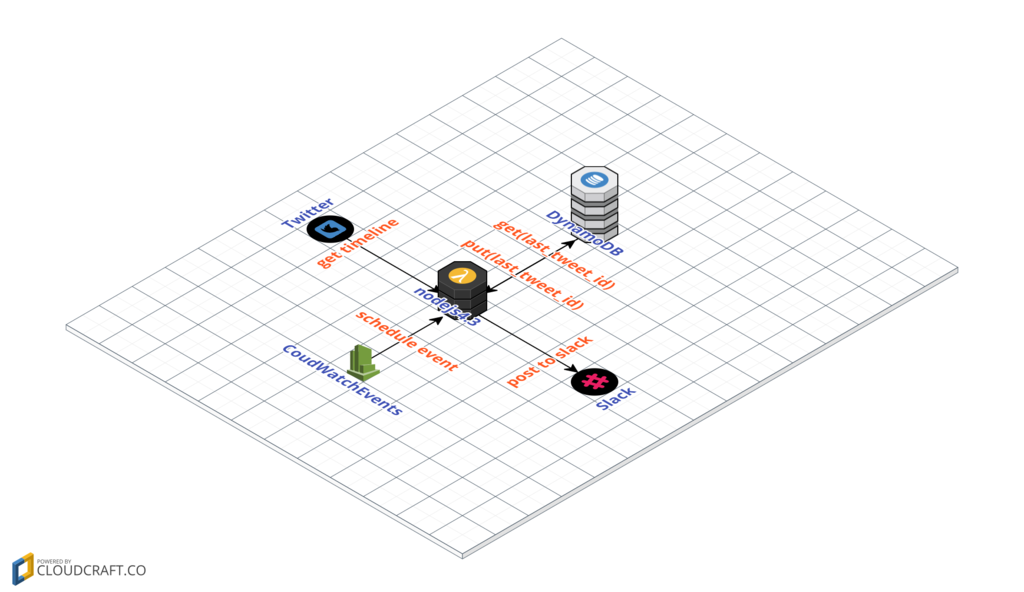
swfz/timeline2slack を functions/timelineディレクトリに配置します
$ git clone https://github.com/swfz/timeline2slack.git functions/timeline
設定を変更
単体で実行していたときと比べて下記設定が必要なので追加
- sample.js
- lambda funcgtion実行時に
exports.handleに設定した関数が呼ばれるので関数呼び出し部分を追加 - context.succeedを追加
- lambda funcgtion実行時に
+ exports.handle = function(event, context) {
.....
.....
+ context.succeed("success")
.....
.....
+ }
中身を見てみる
実際にどんなファイルがアップロードされているのかapex buildでzipを取得して確認します
$ apex build timeline > /tmp/out.zip
$ cd ../
$ unzip /tmp/out.zip
$ ls
README.md _apex_index.js config/  node_modules/  package.json  sample.js
インストールしたモジュールがnode_modulesに入っている
さらに、プロジェクトのファイルに追加して_apex_index.jsというファイルが増えています
_apex_index.jsの中身を見てみると
try {
  var config = require('./.env.json')
  for (var key in config) {
    process.env[key] = config[key]
  }
} catch (err) {
  // ignore
}

exports.handle = require('./index').handle
このようになっていました
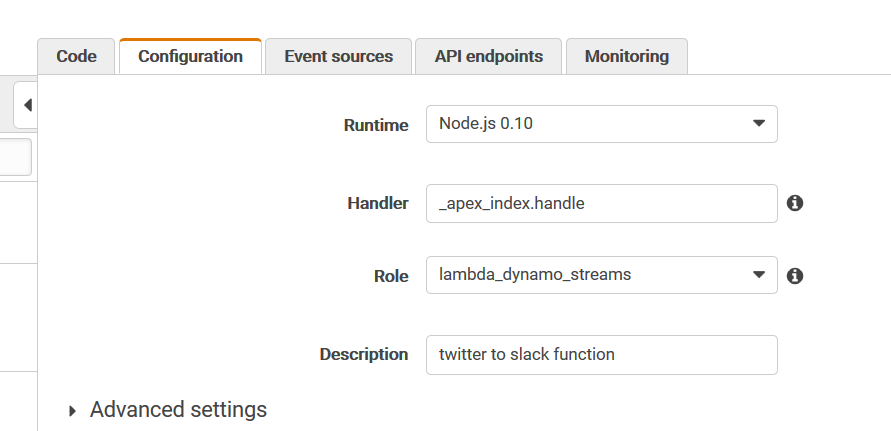
設定のhandlerの箇所とひもづいています
なのでsample.jsをindex.jsに変更し、exports.handleを加える、もしくは設定できれば設定で解決すればよいですね
今回はfunction.jsonを変えました
- function.json
{
  description: twitter to slack function,
  runtime: nodejs4.3,
  timeout: 300,
  handler: sample.handle
}
DynamoDB
dynamoDBは事前にテーブルを作っておきますが、特に難しいことは無いので今回は割愛します
デプロイ、確認
apex --profile swfz --region ap-northeast-1 deploy
apex --profile swfz --region ap-northeast-1 invoke timeline
apex --profile swfz --region ap-northeast-1 logs -f
今回はevent sourceとして何かデータが必要なわけではないのでjsonファイルは用意しません
logを見ながら処理がされているか確認する
/aws/lambda/twitter2slack_timeline 2016-05-28T15:54:31.703Z   730e56dd-24ec-11e6-a70a-13fd412f23fe    736278495840632800
/aws/lambda/twitter2slack_timeline 2016-05-28T15:54:31.941Z   730e56dd-24ec-11e6-a70a-13fd412f23fe    736585313405931500
/aws/lambda/twitter2slack_timeline 2016-05-28T15:54:33.303Z   730e56dd-24ec-11e6-a70a-13fd412f23fe    {}
/aws/lambda/twitter2slack_timeline 2016-05-28T15:54:34.041Z   730e56dd-24ec-11e6-a70a-13fd412f23fe    posted 5 tweet. Posted: Sat May 28 2016 15:07:23 GMT+0000 (UTC) TO Posted: Sat May 28 2016 15:29:02 GMT+0000 (UTC)
/aws/lambda/twitter2slack_timeline 2016-05-28T15:54:34.061Z   730e56dd-24ec-11e6-a70a-13fd412f23fe    posted 5 tweet. Posted: Sat May 28 2016 14:40:56 GMT+0000 (UTC) TO Posted: Sat May 28 2016 14:45:27 GMT+0000 (UTC)
/aws/lambda/twitter2slack_timeline 2016-05-28T15:54:34.160Z   730e56dd-24ec-11e6-a70a-13fd412f23fe    posted 5 tweet. Posted: Sat May 28 2016 15:30:15 GMT+0000 (UTC) TO Posted: Sat May 28 2016 15:33:06 GMT+0000 (UTC)
/aws/lambda/twitter2slack_timeline 2016-05-28T15:54:34.161Z   730e56dd-24ec-11e6-a70a-13fd412f23fe    posted 5 tweet. Posted: Sat May 28 2016 15:33:06 GMT+0000 (UTC) TO Posted: Sat May 28 2016 15:37:25 GMT+0000 (UTC)
/aws/lambda/twitter2slack_timeline 2016-05-28T15:54:34.161Z   730e56dd-24ec-11e6-a70a-13fd412f23fe    posted 5 tweet. Posted: Sat May 28 2016 14:10:32 GMT+0000 (UTC) TO Posted: Sat May 28 2016 14:25:01 GMT+0000 (UTC)
/aws/lambda/twitter2slack_timeline 2016-05-28T15:54:34.393Z   730e56dd-24ec-11e6-a70a-13fd412f23fe    posted 5 tweet. Posted: Sat May 28 2016 14:25:43 GMT+0000 (UTC) TO Posted: Sat May 28 2016 14:28:27 GMT+0000 (UTC)
/aws/lambda/twitter2slack_timeline 2016-05-28T15:54:34.399Z   730e56dd-24ec-11e6-a70a-13fd412f23fe    posted 5 tweet. Posted: Sat May 28 2016 15:37:25 GMT+0000 (UTC) TO Posted: Sat May 28 2016 15:49:58 GMT+0000 (UTC)
/aws/lambda/twitter2slack_timeline 2016-05-28T15:54:34.410Z   730e56dd-24ec-11e6-a70a-13fd412f23fe    posted 5 tweet. Posted: Sat May 28 2016 14:35:34 GMT+0000 (UTC) TO Posted: Sat May 28 2016 14:39:56 GMT+0000 (UTC)
/aws/lambda/twitter2slack_timeline 2016-05-28T15:54:34.493Z   730e56dd-24ec-11e6-a70a-13fd412f23fe    posted 5 tweet. Posted: Sat May 28 2016 14:47:36 GMT+0000 (UTC) TO Posted: Sat May 28 2016 15:01:18 GMT+0000 (UTC)
/aws/lambda/twitter2slack_timeline 2016-05-28T15:54:34.533Z   730e56dd-24ec-11e6-a70a-13fd412f23fe    posted 5 tweet. Posted: Sat May 28 2016 14:28:40 GMT+0000 (UTC) TO Posted: Sat May 28 2016 14:35:34 GMT+0000 (UTC)
/aws/lambda/twitter2slack_timeline END RequestId: 730e56dd-24ec-11e6-a70a-13fd412f23fe
/aws/lambda/twitter2slack_timeline REPORT RequestId: 730e56dd-24ec-11e6-a70a-13fd412f23fe     Duration: 9344.78 ms    Billed Duration: 9400 ms    Memory Size: 128 MB     Max Memory Used: 66 MB
成功!
Event Sourceの設定
lambda functionの定期実行なのでcloudwatch eventsの設定をします
Add Event Sourceタブをクリックして設定します
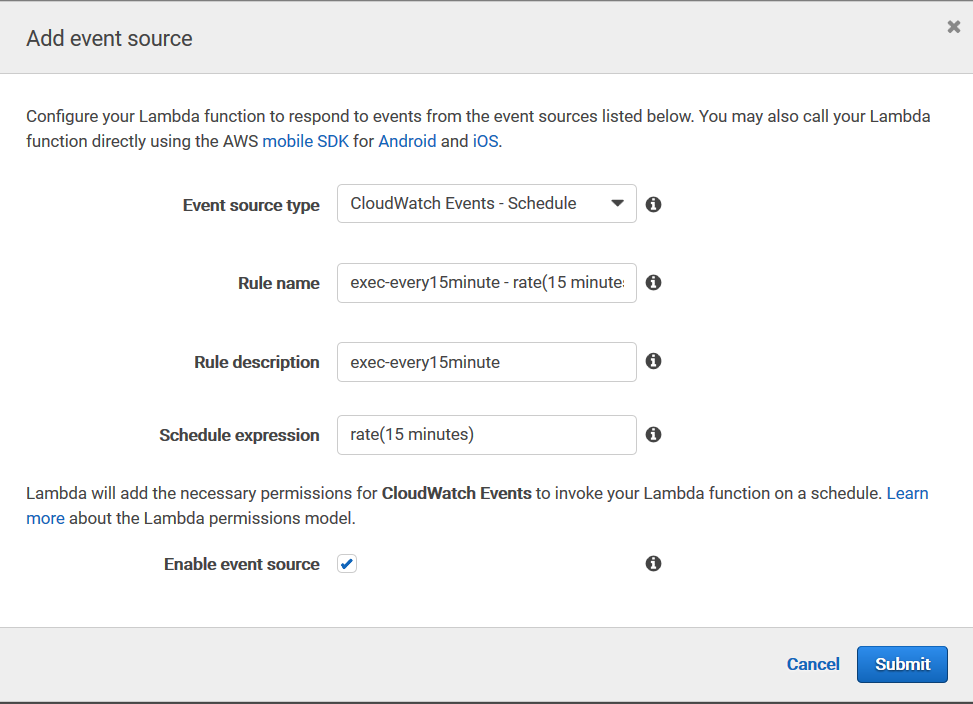
今回は15分ごとに実行するを選択しました
crontabと同様の記述もできるのでより細かなスケジューリングも可能
確認
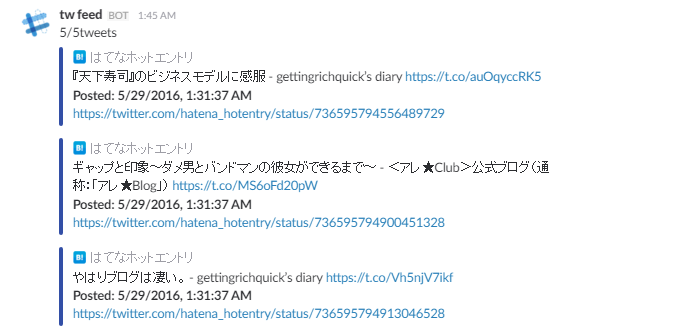
最後に実際にSlackにpostされているのを確認して完了!
まとめ
apex
- 特に難しいことはなかった
- logまで出してくれるのでデプロイ後の確認しやすい
- buildコマンドで確認できるのが便利
- 試してないもの
- rollback
- apex infra (terraform). これでEventSource,DynamoDBの構築まで出来るようにできたら完璧ですね
以前マネジメントコンソールでコード書いて確認して...といったフローでlambda functionを作成していたのでそれに比べてとても楽に管理できるなと思いました
lambdaに関する設定関連もjsonで管理できてしまうので全てバージョン管理しておけばさらに管理しやすそう
試してないものに関しても今後試していきたいです
swfz/twitter2slack: lambda functions in twitter to slack. managed by apex.

